
Path of Exile 2: How to Get Loot Filters on Console
Quick Links
Path of Exile 2 loot filters significantly enhance gameplay, especially in the later stages when item drops increase dramatically. They declutter the screen while highlighting valuable items, resulting in a smoother and more efficient looting experience.
While using a controller or playing on console might seem to complicate item management, PlayStation and Xbox players can utilize loot filters just like PC users. However, the process can be slightly confusing, so this guide provides a step-by-step walkthrough.
How to Link Path of Exile 2 and Console Accounts
To use loot filters on consoles, you must first link your console account to your Path of Exile account via the Path of Exile 1 website. Follow these steps:
- Log in to the Path of Exile website.
- Click your account name in the upper-left corner.
- Select "Manage Account" on the right, below your profile information.
- Under "Secondary Login," click "Connect" for either Sony (PS) or Microsoft (Xbox).
After clicking "Connect," you'll be prompted to log in to your PlayStation or Xbox account. Complete the login process to link your accounts.
Finding and Using Loot Filters
With your accounts linked, return to your profile page on the website and click the "Item Filters" button on the right. Then, click the "Item Filter Ladder" hyperlink. This opens a new tab displaying available loot filters for Path of Exile 2.
A dropdown menu above the filter list allows you to select "PoE 2." Choose your preferred filter and click the "Follow" button on its page. New players might find NeverSink's semi-strict or regular filters ideal.
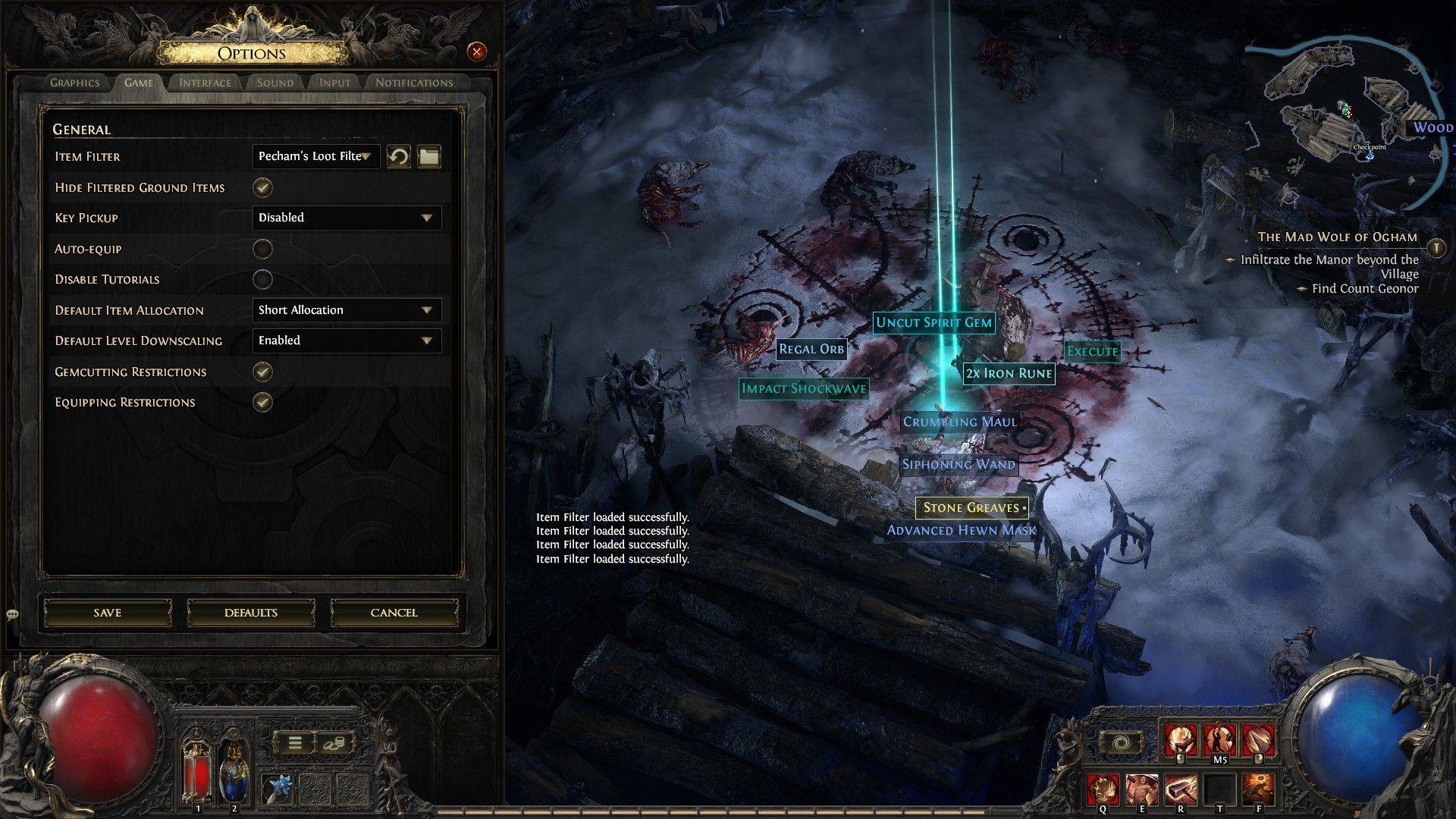 Once you've followed a filter, open Path of Exile 2 and navigate to the Options menu. Go to the "Game" tab; the "Item Filter" option is at the top. Select your chosen filter from the dropdown menu and click "Save." Your in-game item drops will now be distinguished by labels, colors, or sound effects, as defined by your selected filter.












- 1 Roblox Game Codes Updated: April 2025 May 13,2025
- 2 The Best Gaming PC of 2025: Top Prebuilt Desktops Mar 26,2025
- 3 Idle Heroes Team Compositions – January 2025 Mar 16,2025
- 4 Roblox Forsaken Characters Tier List [UPDATED] (2025) Apr 03,2025
- 5 Fortnite: Chapter 6 Season 1 NPC Locations Feb 13,2025
- 6 Tips to Conquer the Dragon Quest III: HD-2D Remake Feb 21,2025
- 7 Roblox: Warrior Cats: Ultimate Edition Codes (January 2025) Feb 12,2025
- 8 Pokémon GO Fest 2025: Fest Dates, Locations, Details Revealed Feb 13,2025





-
Unique Wallpaper Apps for Every Style
A total of 10
-
Top Beauty Trends for This Season
A total of 10
-
Top Free Shooting Games on Google Play
A total of 10











