
MLB The Show 25: How to Request a Trade in Road to the Show Mode
In *MLB The Show 25*, the grass might indeed look greener elsewhere, and San Diego Studio ensures you're not stuck in one spot forever in their popular baseball game. Here's your guide to demanding a trade in *MLB The Show 25* Road to the Show.
How to Get Traded in MLB The Show 25 Road to the Show
After wrapping up your high school career in *MLB The Show 25* Road to the Show, you face a choice: further your skills in college or dive straight into the pros with the team that drafted you. Whichever path you choose, you're not locked into that team for your entire career. This flexibility is crucial, as the dynamics of professional sports can shift rapidly, and a change of scenery might be just what you need to thrive.
In past versions of Road to the Show, you could request a trade once you reached the majors. However, *MLB The Show 25* has changed the rules, and you can no longer directly ask your team to trade you. But don't worry, there's a clever workaround that can get you to a new team faster.
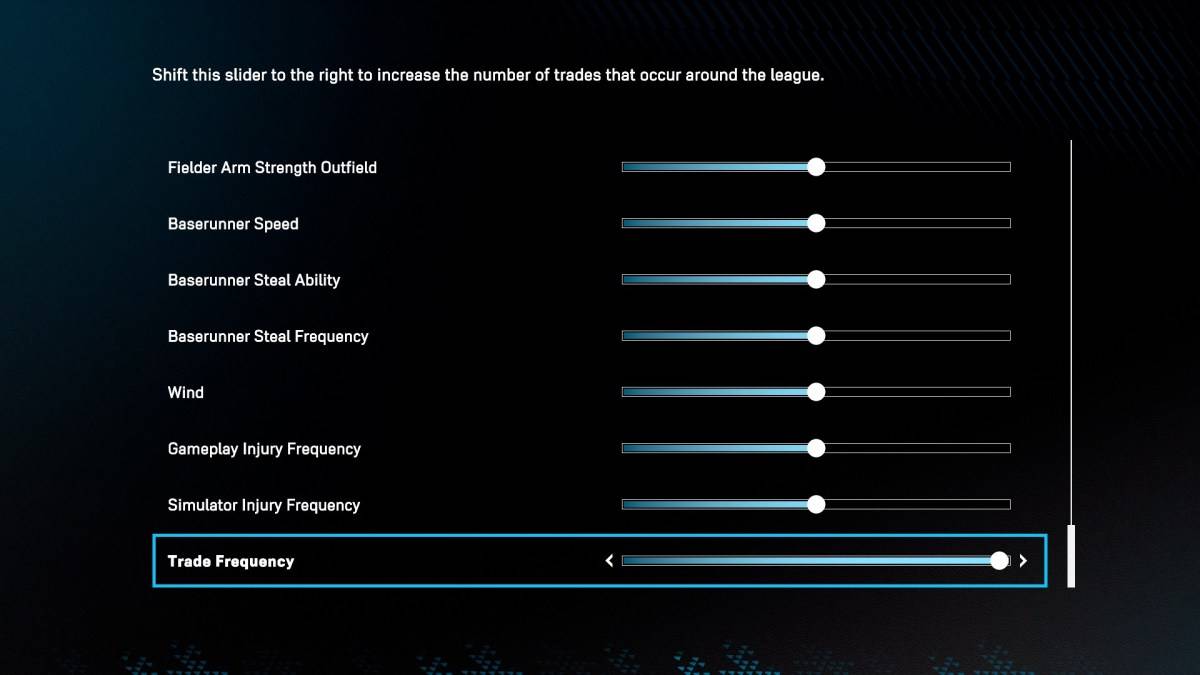
Head over to the Sliders section in the Road to the Show settings, where you'll find an option called "Trade Frequency." This setting controls how often trades occur in the game. By sliding it all the way to the right, you'll increase the likelihood of players, including yourself, being traded. However, don't expect instant results; other teams need to take notice of you first before they'll reach out with trade offers.
Once your agent informs you that there's buzz around the league about you, trade offers will start coming in. Take your time to evaluate these offers, but remember, there's no guarantee that teams will keep calling. When you find a destination that excites you, make the move. After settling into your new team, consider sliding the Trade Frequency back down to minimize further trade requests.
And that's how you can demand a trade in *MLB The Show 25* Road to the Show. If you're looking to optimize your gameplay further, check out the best hitting settings for *MLB The Show 25*.
*MLB The Show 25 is now in Early Access on PlayStation 5 and Xbox Series X|S.*













- 1 Roblox Game Codes Updated: April 2025 May 13,2025
- 2 The Best Gaming PC of 2025: Top Prebuilt Desktops Mar 26,2025
- 3 Idle Heroes Team Compositions – January 2025 Mar 16,2025
- 4 Roblox Forsaken Characters Tier List [UPDATED] (2025) Apr 03,2025
- 5 Roblox: Warrior Cats: Ultimate Edition Codes (January 2025) Feb 12,2025
- 6 Tips to Conquer the Dragon Quest III: HD-2D Remake Feb 21,2025
- 7 Pokémon GO Fest 2025: Fest Dates, Locations, Details Revealed Feb 13,2025
- 8 Fortnite: Chapter 6 Season 1 NPC Locations Feb 13,2025





-
Unique Wallpaper Apps for Every Style
A total of 10
-
Top Beauty Trends for This Season
A total of 10
-
Ultimate Baseball Games for Android
A total of 10











