
Disney Solitaire: Ultimate MAC Guide
Dive into the enchanting world of Disney with the classic game of Solitaire, now infused with magical Disney themes. Disney Solitaire offers a delightful blend of beloved characters, stunning artwork, and soothing music, creating a relaxing yet engaging card game experience. For those who enjoy a larger screen and more precise controls, playing Disney Solitaire on a MAC can significantly enhance your gameplay. Utilizing BlueStacks Air, a lightweight Android app platform designed for MAC, you can easily set up Disney Solitaire for an optimized and smoother gaming session. This guide will walk you through the process of setting up Disney Solitaire on your MAC, ensuring you get the most out of your gaming experience.
Enjoy the Classic Solitaire with a Disney Twist!
One of the key benefits of playing Disney Solitaire on a MAC is the ability to use a keyboard and mouse, which provide more precise control and simplify repetitive card-flipping actions. During our playtest on a MacBook, we discovered that the game is delightfully straightforward, making it perfect for playing on the go—whether you're commuting on a metro or relaxing at home. The casual gameplay is further enhanced on a MAC, thanks to the vibrant and crystal-clear 4K Retina display, which brings the Disney magic to life with stunning clarity.
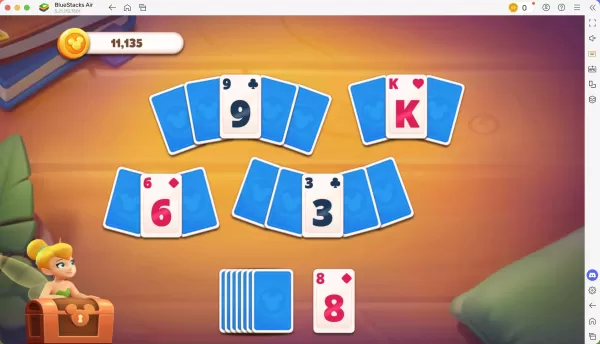
Progress Further with Precise Controls!
As you conquer each level, you'll earn a star that can unlock new cutscenes and characters, enriching the narrative of your Disney adventure. When playing on a MAC with BlueStacks Air, you can customize controls for different actions, tailoring your gaming experience to your preferences. BlueStacks provides default control settings for each game, including Disney Solitaire. To view these controls, simply press SHIFT + TAB on your Mac keyboard. If the default settings don't suit you, feel free to adjust them to create your own control scheme and assign different key bindings to various in-game activities.
How to Install and Start Playing Disney Solitaire on BlueStacks Air
Follow these simple steps to start playing Disney Solitaire on your Mac:
- Download BlueStacks Air: Visit the game's page and click on the "Play Disney Solitaire on MAC" button to download the installer.
- Install BlueStacks Air: Double-click the BlueStacksInstaller.pkg file and follow the installation wizard to complete the setup.
- Launch and Sign-In: Open BlueStacks Air from your Launchpad or Applications folder. Sign in with your Google account to access the Play Store.
- Install Disney Solitaire: Search for Disney Solitaire in the Play Store, then install it.
- Enjoy the Game!: Launch the application and embark on a nostalgic journey through the Disney multiverse!












- 1 Roblox Game Codes Updated: April 2025 May 13,2025
- 2 The Best Gaming PC of 2025: Top Prebuilt Desktops Mar 26,2025
- 3 Idle Heroes Team Compositions – January 2025 Mar 16,2025
- 4 Roblox Forsaken Characters Tier List [UPDATED] (2025) Apr 03,2025
- 5 Tips to Conquer the Dragon Quest III: HD-2D Remake Feb 21,2025
- 6 Roblox: Warrior Cats: Ultimate Edition Codes (January 2025) Feb 12,2025
- 7 Pokémon GO Fest 2025: Fest Dates, Locations, Details Revealed Feb 13,2025
- 8 Fortnite: Chapter 6 Season 1 NPC Locations Feb 13,2025





-
Unique Wallpaper Apps for Every Style
A total of 10
-
Top Beauty Trends for This Season
A total of 10
-
Ultimate Baseball Games for Android
A total of 10











