
How to Turn Off Subtitles in Avowed
Control Subtitles in Avowed: A Simple Guide
Subtitles are a valuable accessibility feature, but not everyone prefers them. This guide shows you how to easily toggle subtitles on or off in Avowed.
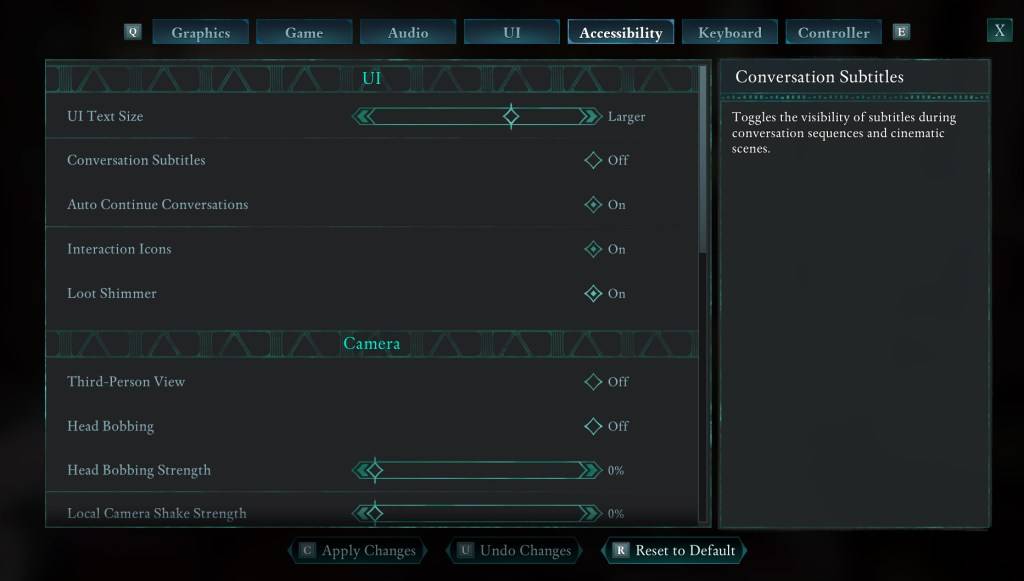
Initially, Avowed presents subtitle options at the start. However, you can adjust these settings later in two locations: the "UI" and "Accessibility" menus. Navigate to "Settings," then select either tab. Locate "Conversation Subtitles" and "Chatter Subtitles" and adjust them to your liking. The "Accessibility" tab offers a clearer presentation of these options.
Why Some Players Disable Subtitles
While subtitles are essential for many, some find them distracting. Ultimately, the choice is personal; enable them if needed, disable them if preferred.
Avowed's Accessibility Features
Avowed provides a range of standard accessibility features. Customize subtitle settings, including size, background opacity, and display duration. Additional options minimize motion sickness by adjusting camera shake and head bobbing. Further enhancements include aim assist adjustments, toggling crouch/sprint, and other player-comfort features.
That's how to manage subtitles in Avowed. Enjoy the game!
Avowed is currently available.













- 1 Roblox Game Codes Updated: April 2025 May 13,2025
- 2 The Best Gaming PC of 2025: Top Prebuilt Desktops Mar 26,2025
- 3 Idle Heroes Team Compositions – January 2025 Mar 16,2025
- 4 Roblox Forsaken Characters Tier List [UPDATED] (2025) Apr 03,2025
- 5 Fortnite: Chapter 6 Season 1 NPC Locations Feb 13,2025
- 6 Roblox: Warrior Cats: Ultimate Edition Codes (January 2025) Feb 12,2025
- 7 Tips to Conquer the Dragon Quest III: HD-2D Remake Feb 21,2025
- 8 Pokémon GO Fest 2025: Fest Dates, Locations, Details Revealed Feb 13,2025





-
Unique Wallpaper Apps for Every Style
A total of 10
-
Top Beauty Trends for This Season
A total of 10
-
Ultimate Baseball Games for Android
A total of 10











