
Ragnarok M: Best MVP Card Rerolling Guide
In Ragnarok M: Classic, MVP cards are game-changers, boosting your character's abilities and lining your pockets with Zeny. This guide shows you a lightning-fast method to reroll for these valuable cards—in about five minutes, even if you're a newbie. Follow these steps carefully; skipping any could lead to delays or failure.
Got a burning question about guilds, gaming strategies, or our product? Join our Discord community for discussions and support!
Level Up to 10—Fast!
Start with a fresh account or an alt character to speed things up. Head straight to the frontier area and focus on hitting level 10 ASAP. Use the "New Beginnings" event to grab a Meteoric Chain—this item significantly boosts your XP gain, making level 10 achievable in just 3-4 minutes. Using this is crucial for efficient rerolling.
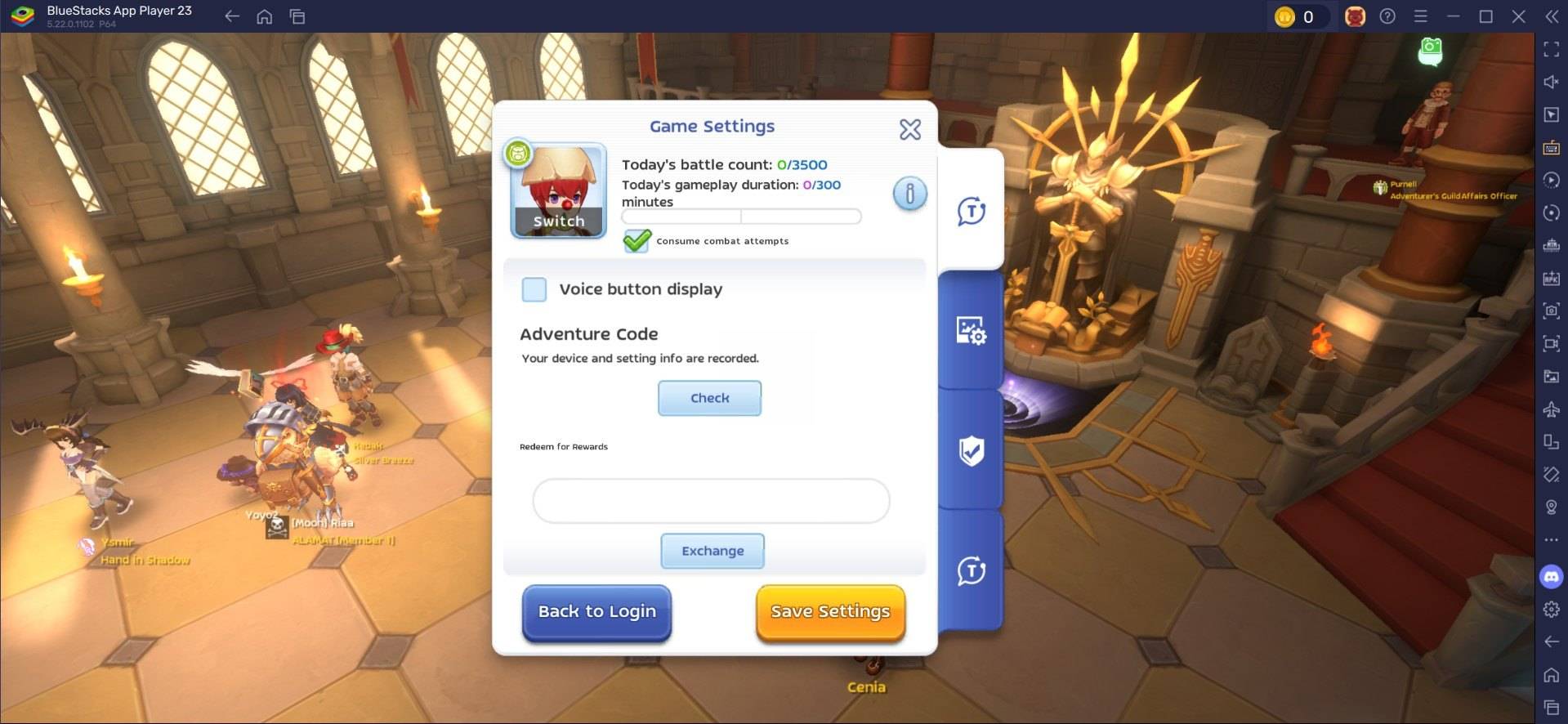
Enter Your Redeem Codes
Once you hit level 10, you can access the settings menu and enter any available reroll codes. Be precise; these codes are time-sensitive and case-sensitive. If a code doesn't work on the first try, keep trying until it's accepted. Claim all your rewards after successful validation. For the latest active codes, check our blog!
Sell or Trade Your MVP Cards
Got a valuable MVP card? Head to the in-game Exchange to sell or trade it. High-demand cards like Moonlight Flower can fetch 20,000-30,000 Zeny. Smart trading techniques, like Ghost Trading, can further maximize your profits.
Reroll Even Faster with BlueStacks
Playing Ragnarok M: Classic on PC with BlueStacks isn't just about a better gaming experience; it also massively boosts your rerolling efficiency. BlueStacks' Multi-Instance Manager lets you create multiple instances, each acting like a separate Android device. Clone your current instance to avoid reinstalling the game repeatedly. Once you have enough instances for your system, use the Instance Sync feature, designating your original instance as the "master." This lets you control all instances from the master, making the rerolling process incredibly fast. Simply perform the reroll on the master instance, and watch it replicate across all other instances. Use guest accounts for each instance and bind your account once the reroll is complete. Enjoy the larger screen, keyboard, and mouse precision of playing on your PC!













- 1 Roblox Game Codes Updated: April 2025 May 13,2025
- 2 The Best Gaming PC of 2025: Top Prebuilt Desktops Mar 26,2025
- 3 Idle Heroes Team Compositions – January 2025 Mar 16,2025
- 4 Roblox Forsaken Characters Tier List [UPDATED] (2025) Apr 03,2025
- 5 Fortnite: Chapter 6 Season 1 NPC Locations Feb 13,2025
- 6 Roblox: Warrior Cats: Ultimate Edition Codes (January 2025) Feb 12,2025
- 7 Tips to Conquer the Dragon Quest III: HD-2D Remake Feb 21,2025
- 8 Pokémon GO Fest 2025: Fest Dates, Locations, Details Revealed Feb 13,2025





-
Unique Wallpaper Apps for Every Style
A total of 10
-
Top Beauty Trends for This Season
A total of 10
-
Ultimate Baseball Games for Android
A total of 10











