
Ninja Time: Trello & Discord Integration
Dive into the exciting world of Ninja Time, a captivating Roblox experience! With a wealth of information readily available on both the Trello board and the incredibly active Discord server (so active, in fact, that the verification bot recently struggled to keep up!), you'll find everything you need to master this ninja adventure. Want to learn about clans, bosses, weapons, and the enigmatic Red Eyes? This guide will show you how to access the essential Ninja Time Trello and Discord communities.
Recommended Videos Ninja Time Trello & Discord Guide
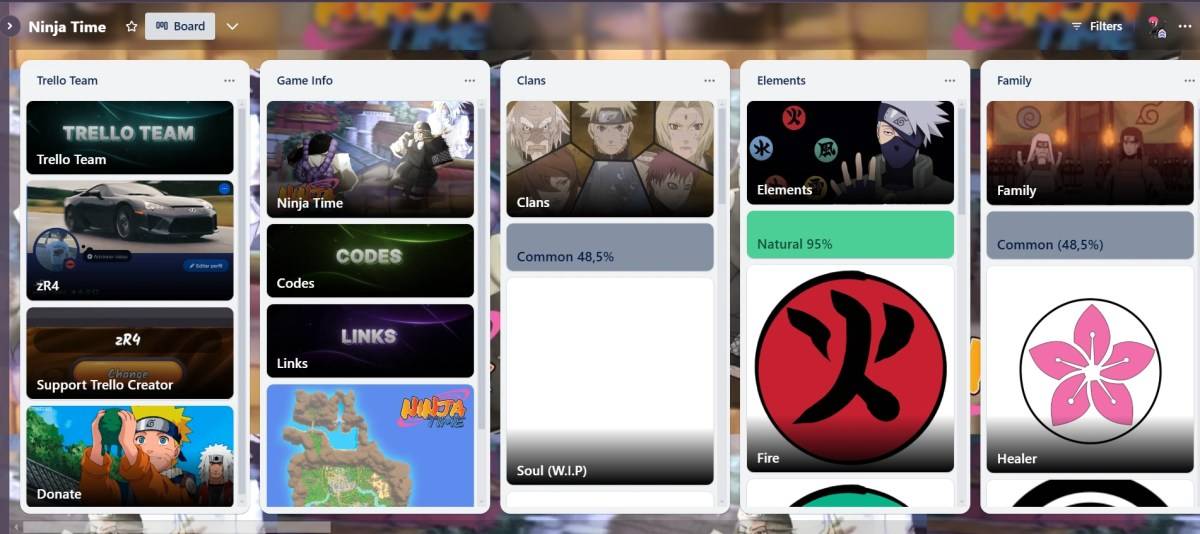
Here are the key Ninja Time community channels:
- Ninja Time Trello Board
- Ninja Time Discord Server
- Vibrant Ninja Time Roblox Group
- Ninja Time X/Twitter Page
Before embarking on your ninja journey, we strongly recommend consulting the Trello board. It’s your essential starter pack, brimming with crucial information, items, and game mechanics. Here’s a detailed breakdown of what you'll find:
- Comprehensive game information (Codes, Links, Map of Fire Country)
- All clans
- All elements
- Family Red Eyes
- Sub-Jutsus
- All modes and skills
- All bosses and raid drops
- All NPCs
- All consumables (buffs)
- Accessories
- All weapons and sub-weapons
- Exclusive collectables
- Other info (Achievements, Gamepasses, etc.)
While the Trello board excels in providing comprehensive game information, the Discord server shines in other areas, such as codes and giveaways, and even boasts a dedicated fan art section. It's a vibrant chat-based community, offering a platform for socializing and information exchange in English, Portuguese, Spanish, and French. It's a great place to find answers to your questions, share game suggestions, find party members, and stay up-to-date on the latest game updates.
How to Search Ninja Time on Trello and Discord:
| Prefix | Use | Prefix | Use |
| in: channel-name | Search within specific channels (e.g., in: questions). | before: date | Find messages sent before a specific date. |
| from: username | Find messages from a specific user. | after: date | Find messages sent after a specific date. |
| has: image | Find messages containing images. | pinned: true | Find pinned messages. |
That concludes our guide to the Ninja Time Trello and Discord communities. Before you begin your adventure, be sure to check out the available Ninja Time codes – they’ll give you a significant head start!












- 1 Roblox Game Codes Updated: April 2025 May 13,2025
- 2 The Best Gaming PC of 2025: Top Prebuilt Desktops Mar 26,2025
- 3 Idle Heroes Team Compositions – January 2025 Mar 16,2025
- 4 Roblox Forsaken Characters Tier List [UPDATED] (2025) Apr 03,2025
- 5 Fortnite: Chapter 6 Season 1 NPC Locations Feb 13,2025
- 6 Roblox: Warrior Cats: Ultimate Edition Codes (January 2025) Feb 12,2025
- 7 Tips to Conquer the Dragon Quest III: HD-2D Remake Feb 21,2025
- 8 Pokémon GO Fest 2025: Fest Dates, Locations, Details Revealed Feb 13,2025





-
Unique Wallpaper Apps for Every Style
A total of 10
-
Top Beauty Trends for This Season
A total of 10
-
Ultimate Baseball Games for Android
A total of 10











