
How To Kill All Mobs in Minecraft
Mastering Minecraft Mob Elimination: A Comprehensive Guide to the /kill Command
There are many reasons to eliminate mobs in Minecraft. The simplest method involves using commands, specifically the /kill command. However, even this seemingly straightforward command has nuances. This guide explains how to use it effectively.
Prerequisites: Enabling Cheats
Before using any commands, ensure your Minecraft world has cheats enabled. Instructions for both Java and Bedrock editions are provided below.
The /kill Command: Syntax and Usage
The basic /kill command is simple: /kill. However, this will kill you. To target specific entities, use the following syntax:
-
Killing All Mobs:
/kill @e[type=!minecraft:player](@eselects all entities;type=!minecraft:playerexcludes the player.) -
Killing Specific Mob Types:
/kill @e[type=minecraft:chicken](Replaceschickenwith the desired mob type.) -
Killing Mobs Within a Radius:
- Java Edition:
/kill @e[distance=..15](Kills all entities within 15 blocks.) - Bedrock Edition:
/kill @e[r=10](Kills all entities within a radius of 10 blocks.)
- Java Edition:
-
Killing Specific Mobs Within a Radius:
- Java Edition:
/kill @e[distance=..15,type=minecraft:sheep](Kills sheep within 15 blocks.) - Bedrock Edition:
/kill @e[r=10,type=minecraft:sheep](Kills sheep within a radius of 10 blocks.)
- Java Edition:
Command autocompletion assists, minimizing memorization.
Important Entity Selectors:
@p: Nearest player@r: Random player@a: All players@e: All entities@s: Yourself
Enabling Cheats in Minecraft:
Java Edition:
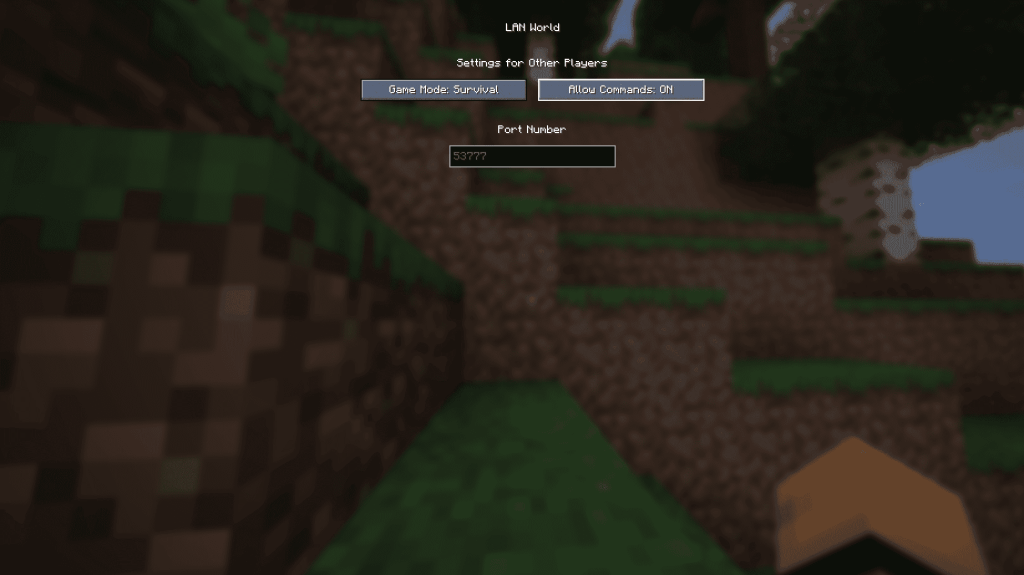
- Enter your world.
- Press Esc.
- Select "Open to LAN."
- Toggle "Allow Commands" to "On."
- Commands are now active, but this setting resets each time you load the world. To permanently enable cheats, create a world copy with cheats enabled. In the main menu, select "Singleplayer," choose your world, click "Re-create," and enable "Allow Commands" during world creation.
Bedrock Edition:
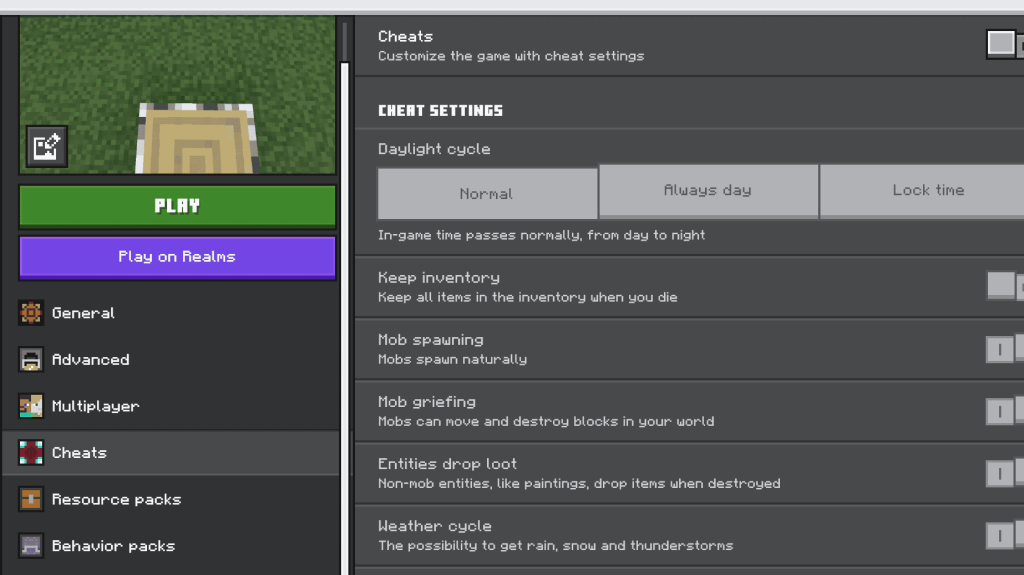
- Navigate to your worlds.
- Click the pencil icon next to the desired world.
- In the bottom-right menu, toggle "Cheats" to "On."
Minecraft is available on PlayStation, Xbox, Nintendo Switch, PC, and mobile devices.













- 1 Roblox Game Codes Updated: April 2025 May 13,2025
- 2 The Best Gaming PC of 2025: Top Prebuilt Desktops Mar 26,2025
- 3 Idle Heroes Team Compositions – January 2025 Mar 16,2025
- 4 Roblox Forsaken Characters Tier List [UPDATED] (2025) Apr 03,2025
- 5 Fortnite: Chapter 6 Season 1 NPC Locations Feb 13,2025
- 6 Tips to Conquer the Dragon Quest III: HD-2D Remake Feb 21,2025
- 7 Roblox: Warrior Cats: Ultimate Edition Codes (January 2025) Feb 12,2025
- 8 Pokémon GO Fest 2025: Fest Dates, Locations, Details Revealed Feb 13,2025





-
Unique Wallpaper Apps for Every Style
A total of 10
-
Top Beauty Trends for This Season
A total of 10
-
Ultimate Baseball Games for Android
A total of 10











