
"Guide: Acquiring and Utilizing the Global Palbox in Palworld"
If you thought *Pokemon* and *Palworld* couldn't get any more similar, think again. The latest update in March 2025 introduces a game-changing feature: the Global Palbox, which lets you transfer your Pals between different worlds. It might seem a bit tricky at first, but don't worry—we've got you covered on how to get and use this new addition to *Palworld*.
How To Get the Global Palbox in Palworld
With the March 2025 update, the Global Palbox is now accessible to all *Palworld* players. To get your hands on it, simply navigate to the Build screen and find the Pal section. You'll spot the Global Palbox as a futuristic structure complete with a radio dish. To construct it, you'll need 1 Paldium Fragment, 8 Wood, and 3 Stone.
These resources are plentiful in *Palworld*, and most players should have them in abundance. If you're running low, here's where to find each:
| Resource | Location |
| Wood | Obtained by cutting trees. |
| Stone | Obtained by mining rocks. |
| Paldium Fragment | Obtained by mining Paldium rocks. |
For more on *Palworld*, check out our list of the 10 Best Transport Pals in Palworld – Transporting Work Pals, Ranked.
How To Use the Global Palbox in Palworld
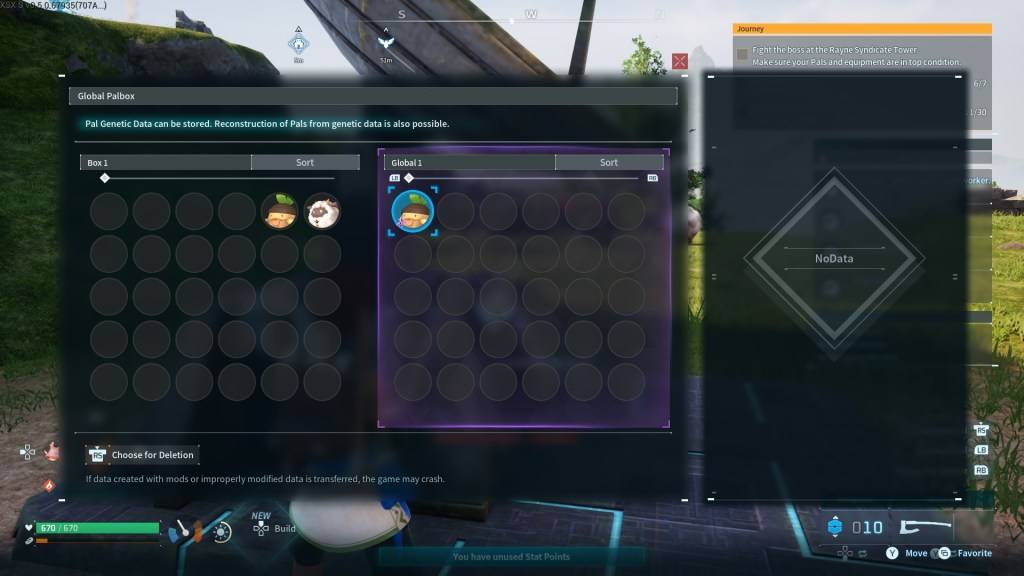 Unlike *Pokemon*, where you can transfer a Pokemon from one game to another, *Palworld* allows you to store your Pal's Genetic Data in a Global database. This means you can reconstruct your Pal in another world, keeping your original Pal intact while having another version in a different world. Remember, only one version of a specific Pal can be reconstructed in each world.
If you're eager to use your favorite Pals across multiple worlds, follow these steps to use the Global Palbox in *Palworld*:
Copying a Pal’s Genetic Data
- Load into the first *Palworld* world.
- Construct and open the Global Palbox in the first world.
- Locate the desired Pal in your boxes.
- Move the Pal’s Genetic Data to the Global database.
Reconstructing a Pal
- Load into the second *Palworld* world.
- Construct and open the Global Palbox in the second world.
- Locate the desired Pal’s Genetic Data and move it to your boxes.
- Find the Pal in your boxes and move them into your party to reconstruct.
You can repeat this process as often as you like, making it easier to optimize your Pals across different worlds. This feature adds a thrilling dimension to catching Pals, as they can now thrive in multiple worlds.
And that's how to get and use the Global Palbox in *Palworld*. For more tips, learn how to make Pals transport items to another location in the game.
*Palworld is available now in Early Access on PlayStation, Xbox, and PC.*













- 1 Roblox Game Codes Updated: April 2025 May 13,2025
- 2 The Best Gaming PC of 2025: Top Prebuilt Desktops Mar 26,2025
- 3 Roblox Forsaken Characters Tier List [UPDATED] (2025) Apr 03,2025
- 4 Idle Heroes Team Compositions – January 2025 Mar 16,2025
- 5 Roblox: Warrior Cats: Ultimate Edition Codes (January 2025) Feb 12,2025
- 6 Fortnite: Chapter 6 Season 1 NPC Locations Feb 13,2025
- 7 Pokémon GO Fest 2025: Fest Dates, Locations, Details Revealed Feb 13,2025
- 8 Tips to Conquer the Dragon Quest III: HD-2D Remake Feb 21,2025





-
Unique Wallpaper Apps for Every Style
A total of 10
-
Top Beauty Trends for This Season
A total of 10
-
Top Free Shooting Games on Google Play
A total of 10











