
FragPunk Best Settings and Crosshair Codes
Many games launch with optimization issues that developers later address through patches. However, *FragPunk* has impressed players with its smooth performance right from the start. While there's always room for more frames, here are the best *FragPunk* settings and crosshair codes to enhance your gameplay experience.
FragPunk Settings Overview
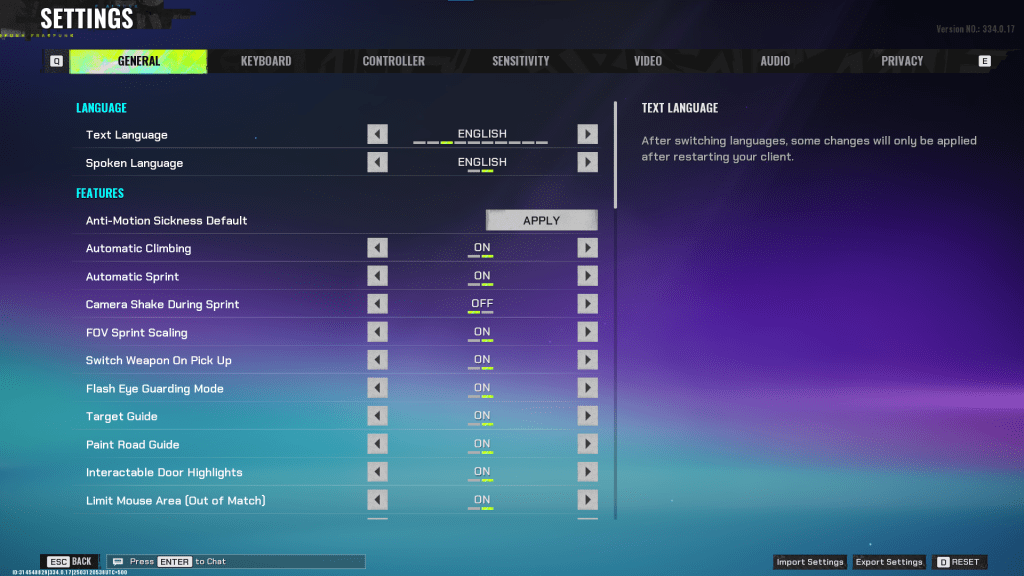
The settings in *FragPunk* are organized into five tabs. Most of these, aside from the Video tab, focus on quality-of-life and accessibility features that don't directly impact performance. However, they can significantly enhance your gameplay. Here's a breakdown of the essential settings to adjust, while others can be left at default or adjusted to your liking.
General
The General tab includes numerous quality-of-life and personal preference settings. It's beneficial to experiment with these to find what suits your playstyle best. Here are the recommended settings, though personal preference plays a role:
- Automatic Climbing – On
- Automatic Sprint – On
- Camera Shake During Sprint – Off
- FOV Sprint Scaling – On
- Flash Eye Guarding – On
- Keep Player Centered – On
- Minimap Orientation Rotate – On
- Performance Metrics – On
- Ping Visibility – 1
- Hide Overly Visible Skin Components from Enemies – On
The General tab also includes options for creating your crosshair, which we'll discuss later.
Keyboard/Controller
These tabs allow customization of your keybinds. You're free to choose any binds, but it's worth noting the sprint key on the keyboard. With Automatic Sprint enabled, the Shift key is available. It's advisable to bind the walk function to Shift, aligning with common binds in other tactical shooters like *VALORANT* and *CS2*.
Sensitivity
Sensitivity settings are entirely personal. You can experiment with different sensitivities or use online calculators to convert settings from games like *VALORANT* or *CS2*.
Audio
For the Audio settings, set the Sound Effects volume to a comfortable level. Lower the Music, Announcer, and Button volumes. Enable Character Voice Simplification to reduce unnecessary character chatter. Voice Chat settings are up to personal preference.
FragPunk Best Video Settings
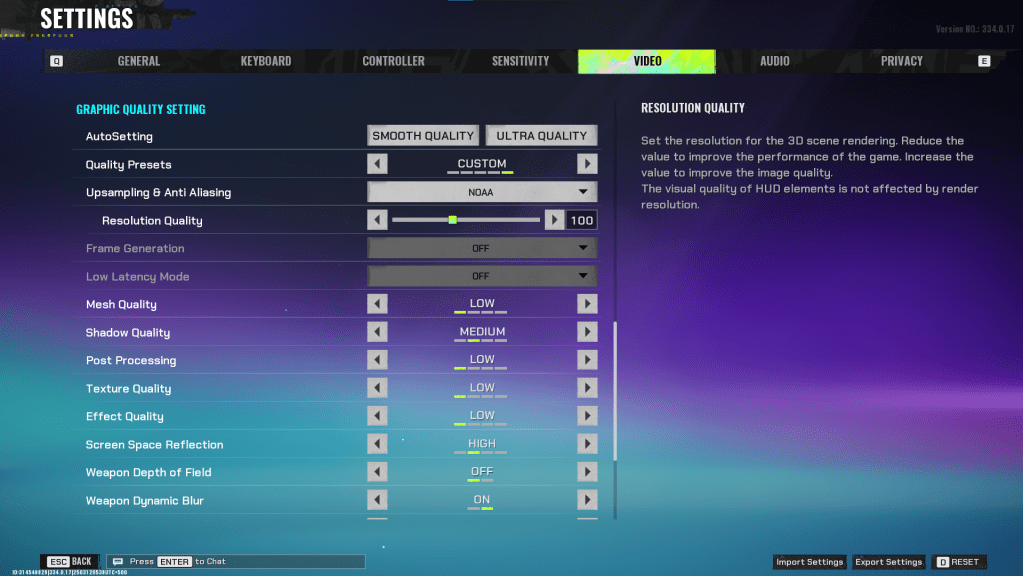
The Video tab is crucial for optimizing performance. The settings here prioritize performance over visual quality, which is vital for a competitive shooter like *FragPunk*. While users with high-end PCs may opt for better graphics, these settings are ideal for most players seeking performance:
Display
| Display Screen | Your Preferred Monitor |
| Display Mode | Fullscreen |
| Display Ratio | Monitor’s Default |
| Display Resolution | Monitor’s Native |
| FOV | 125 |
| Filter | Default or Personal Preference |
| Post Processing Intensity | None or Low |
| Menu Frame Rate Limit | 60 |
| Gameplay Framerate Limit | Monitor’s Refresh Rate |
| Out of Focus Framerate Limit | 60 |
| Brightness | 1 or adjust according to preference |
| Sharpen | Same as Brightness |
| Vertical Sync | Off |
| Antii-tearing | Off |
| Graphics API | Experiment with DX11 and 12 to see what works best with your system |
Minimalistic Graphics
*FragPunk* offers a unique Minimalistic Graphics option, allowing you to reduce visual effects for a performance boost. Enabling this can increase your frame rate by 15-20 fps, although it significantly impacts the visual quality. If you're willing to make this trade-off, use the following settings:
| Material Complexity | Minimalistic |
| Light Complexity | Minimalistic |
| Scene Saturation | Minimalistic |
| Effects Complexity | Minimalistic |
| Dead Effect | Off |
| Damage Numbers | On |
| UI Info Simplification | On |
| UI Animation Simplification | Off |
Graphics Quality Settings
| Quality Presets | Custom |
| Upscaling and Anti-Aliasing | Depending on your GPU, choose FSR 2 with Performance for AMD GPUs or NVIDIA Image Scaling with Performance for NVIDIA GPUs. You can also set it to NOAA with 100% if you don’t want to use any upscaling. |
| Mesh Quality | Low |
| Shadow Quality | Medium |
| Post Processing | Low |
| Texture Quality | Low |
| Effect Quality | Low |
| Screen Space Reflections | High |
| Weapon Depth of Field | Off |
| Weapon Dynamic Blur | On |
| Scene Dynamic Blur | Off |
| Ray Tracing | Off |
| SSGi | On |
| UI Resolution | High. Doesn’t affect in-game FPS. |
| Animation Physical | Off |
FragPunk Best Crosshair Codes
A well-designed crosshair can enhance your performance in any shooter, and *FragPunk* is no exception. While a perfect crosshair won't make you a pro, it can certainly help. Here are some recommended crosshair codes for *FragPunk*:
Classic Plus
azazafzaezaezaezaezfczazaabzaafzazaaabzazaczaczaczaczfcbzbzaabzaafzazaaabzFFFFFFzFFFFFFClassic Dot
czazafzaezagzagzagzfczbzaabziedzazaaabzazaczaczaczaczfcbzbzaabzaafzazaaabzFFFFFFzFFFFFFPrecision Plus
azazafzaezaezaezaezabzazaabziedzazaaabzazaczaczaczaczfcbzbzaabzaafzazaaabzFFFFFFzFFFFFFClassic T Shaped
bzazafzaezaezaezaezabzbzaabziedzazaaabzazaczaczaczaczfcbzbzaabzaafzazaaabzFFFFFFzFFFFFThese are the best *FragPunk* settings and crosshair codes to optimize your gameplay experience. *FragPunk is available now on PC.*











- 1 Roblox Game Codes Updated: April 2025 May 13,2025
- 2 The Best Gaming PC of 2025: Top Prebuilt Desktops Mar 26,2025
- 3 Idle Heroes Team Compositions – January 2025 Mar 16,2025
- 4 Roblox Forsaken Characters Tier List [UPDATED] (2025) Apr 03,2025
- 5 Tips to Conquer the Dragon Quest III: HD-2D Remake Feb 21,2025
- 6 Roblox: Warrior Cats: Ultimate Edition Codes (January 2025) Feb 12,2025
- 7 Pokémon GO Fest 2025: Fest Dates, Locations, Details Revealed Feb 13,2025
- 8 Fortnite: Chapter 6 Season 1 NPC Locations Feb 13,2025





-
Unique Wallpaper Apps for Every Style
A total of 10
-
Top Beauty Trends for This Season
A total of 10
-
Ultimate Baseball Games for Android
A total of 10











