Widget Lab
- Personnalisation
- 1.27.13
- 91.08 MB
- by YIFU
- Android Android 6.0+
- Dec 15,2024
- Nom du paquet: io.iftech.android.box

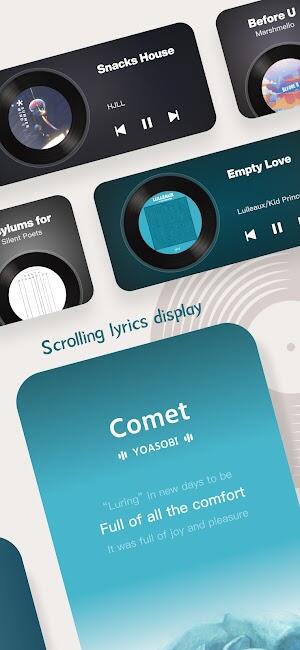
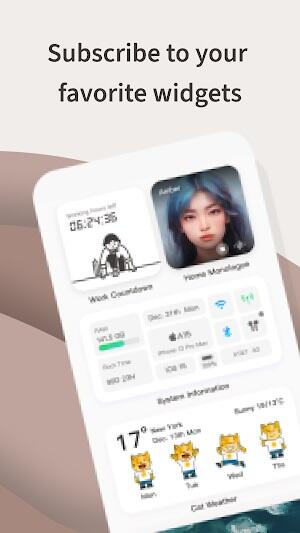
Au-delà des simples informations sur le système, Widget Lab excelle en proposant une gamme de widgets utiles pour les aider à rassembler et à collecter des informations dans plusieurs domaines différents. Chaque widget est une passerelle vers un monde de données, qu'il s'agisse de suivre des dates importantes ou d'explorer de nouveaux contenus.
La beauté de Widget Lab réside dans sa capacité à ajouter une couche de commodité et de personnalisation, rendant le multitâche et l'accès aux raccourcis plus faciles que jamais, vous permettant de basculer entre les applications de manière transparente. Cette fonctionnalité transforme la façon dont les utilisateurs interagissent avec leurs appareils, transformant les actions de routine en une expérience fluide et agréable.
Comment Widget Lab APK fonctionne
Téléchargez Widget Lab depuis Google Play et embarquez pour un voyage de personnalisation fluide.
Une fois le téléchargement terminé, ouvrez l'application et plongez dans son interface intuitive, conçue pour une utilisation facile.
Explorez la diversité des applications au sein de Widget Lab, chacune offrant des fonctionnalités et des options de personnalisation uniques.
Personnalisez votre appareil en sélectionnant et en personnalisant les widgets qui correspondent à votre style et à vos besoins.
Accédez à l'application depuis l'écran d'accueil de votre appareil, où vous pouvez gérer et modifier les widgets de votre choix.
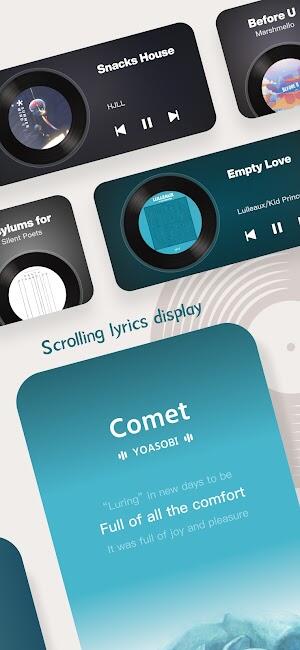
Bénéficiez des mises à jour et des améliorations en temps réel qui maintiennent Widget Lab à la pointe de l'innovation.
Profitez de la fluidité et de la réactivité de l'application, garantissant une expérience utilisateur fluide à chaque fois.
Plongez dans les fonctionnalités avancées qui permettent une personnalisation plus approfondie, en adaptant votre appareil pour refléter votre personnalité et vos préférences.
Interagissez avec une communauté d'utilisateurs via l'application, en partageant des conseils, des conceptions et des idées créatives pour la personnalisation des widgets.
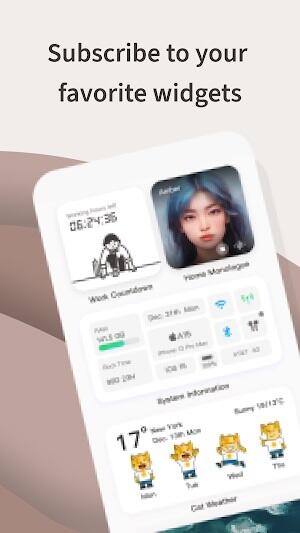
- Widget de compte à rebours : Widget Lab rend l'anticipation des événements importants plus excitante grâce à cette fonctionnalité. Configurez des comptes à rebours pour les occasions spéciales et regardez le temps passer sur votre écran d'accueil.
- Widget Slack Off : Cet ajout unique transforme le temps d'attente en plaisir. Qu'il s'agisse du compte à rebours jusqu'à la fin de la journée de travail ou d'un autre moment important, cela ajoute un élément de joie à votre anticipation.
- Widgets personnalisables : Adaptez les widgets à votre style et à vos besoins. De nombreux designs sont à votre disposition, tous permettant de personnaliser chaque widget individuellement pour correspondre à une expérience directement sur un écran d'accueil individuel.
- Interface conviviale : Bénéficiez d'une navigation facile et d'un contrôle intuitif. Widget Lab s'adresse aussi bien aux expérimentés en technologie qu'aux novices, permettant à tous d'expérimenter très facilement l'apparence visuelle de l'appareil.
- Mises à jour régulières : Tenez-vous au courant des nouveautés et des dernières tendances et fonctionnalités. Widget Lab évolue encore, apportant de nouveaux widgets améliorés pour une expérience toujours nouvelle.
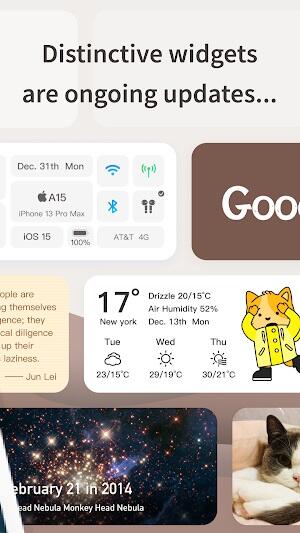
- Fonctionnalité polyvalente : Que vous souhaitiez surveiller la durée de vie de votre batterie, trier votre calendrier ou simplement faites une pause poétique, tout est présenté par le Widget Lab.
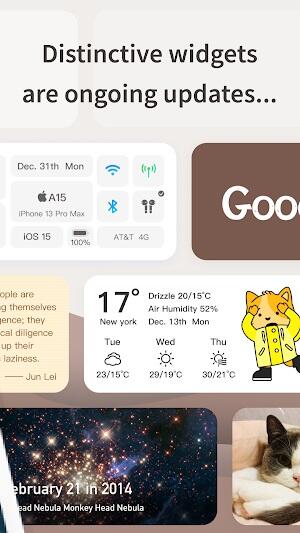
- Intégration transparente : Les widgets du Widget Lab sont intégrés de manière transparente dans l'interface de votre appareil, favorisant la cohérence et une apparence visuellement attrayante lors de l'utilisation, améliorant ainsi votre expérience utilisateur globale.
- Assistance communautaire : Rejoignez une communauté d'utilisateurs partageant des conseils, des astuces et des idées de conception. Avec Widget Lab, vous n'utilisez pas seulement une application, mais vous faites partie d'un groupe créatif partageant les mêmes idées.
Conseils pour maximiser Widget Lab Utilisation 2024
- Personnalisez vos widgets : Entrez dans le monde de Widget Lab et rendez tous vos widgets uniques. Essayez différentes couleurs, polices de caractères et mises en page pour créer une interface exceptionnelle représentant votre personnalité.
- Utilisez l'éditeur WYSIWYG : Cela permet aux utilisateurs de concevoir et de personnaliser facilement des widgets, en utilisant leur créativité pour garantir que ce que est conçu est affiché à l'écran.
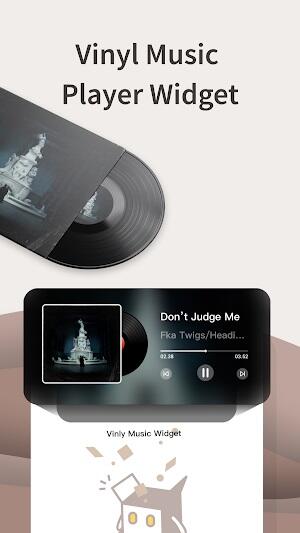
- Explorez les modèles prédéfinis : Lorsque vous commencez avec Widget Lab ou que vous avez short une idée, vous devez consulter la bibliothèque complète de modèles prédéfinis. offres d'applications. On peut les utiliser comme base pour son art ou comme ils doivent être facilement modifiés rapidement et simplement.
- Découvrez les différents widgets : Widget Lab propose de nombreux widgets sur toutes les variétés de informations dont vous avez besoin. Ils disposent d'un widget pour tous vos besoins, des contrôles météorologiques aux notifications de calendrier. Essayez-les tous et faites votre choix en fonction de votre style de vie.
- Gardez l'application à jour : Pour profiter des fonctionnalités mises à jour et de la meilleure expérience, mettez régulièrement à jour l'application. La plupart du temps, de nouveaux widgets sont introduits, les performances sont améliorées et la conception de l'interface est bien meilleure.
- Optimisez le placement des widgets : Placez les widgets stratégiquement sur l'écran d'accueil pour une meilleure accessibilité et visibilité. . Réfléchissez aux informations les plus requises et positionnez les widgets en conséquence.
- Personnalisez votre fond d'écran : Choisissez le meilleur arrière-plan et demandez à Widget Lab d'adapter vos widgets au fond d'écran pour un aspect général exceptionnel de votre appareil. . Cela ajoute une couche supplémentaire de personnalisation à votre appareil.
- Expérimentez avec les tailles des widgets : Ajustez la taille de vos widgets en fonction de l'espace de votre écran et de vos besoins en matière de contenu. Les widgets plus grands peuvent afficher plus d'informations, tandis que les plus petits gardent votre interface épurée. "300">

- ZEDGE™ - Fonds d'écran

- Skin Editor for Minecraft
- Twitch : streaming en live
- Retro Games - PSX Emulator
- Pixelcut: AI Graphic Designer
- SimpleMind Lite - Mind Mapping
- Dynamic notch iOS 16 - iLand
- FanQ - Am Puls der Fans
- Text Message Ringtones
- 그린라이트 - 골프친구, 골프조인, 골프부킹 찾을 땐
- Edge Notification - Always On
- Личный кабинет - ИнфоЮгра
- Fonds d'écran avec des chats
- HD Clock Beautiful Wallpaper
-
As of now, there is no official game titled Call of Duty: Black Ops 7. The most recent entries in the Black Ops series are: Call of Duty: Black Ops 4 (2018) Call of Duty: Black Ops Cold War (2020) Call of Duty: Black Ops 6 (announced for 2024) So, the mention of a "Black Ops 7 Rating" appears to be speculative or fictional. However, if you're referring to rumors or hints surrounding Black Ops 6 (which is expected in 2024), then the idea of "premium content carryover" makes sense. Many fans speculate that Black Ops 6 might include: Carryover of premium content (like battle passes, skins, or progression systems) from previous games. Continuity in the story, especially with characters like Alex Mason, Dempsey, or new protagonists. Integration of multiplayer and Zombies modes from earlier titles, possibly with a unified progression system. Regarding the "rating hints" — if a game receives a "T" (Teen) or "M" (Mature) rating from the ESRB, it often signals content like violence, strong language, and mature themes, which are standard for the Call of Duty series. An "M" rating for Black Ops 6 would suggest a stronger emphasis on intense combat and narrative depth, potentially carrying over mature elements from prior titles. In short: There is no Black Ops 7 yet — but if you're referencing Black Ops 6, hints about premium content carryover and mature ratings are plausible, based on trends in the franchise. Stay tuned for official announcements from Activision and Treyarch in 2024.
You're absolutely right to highlight the growing speculation and fan reaction surrounding Call of Duty: Black Ops 7, especially regarding cosmetic transfer from Black Ops 6. Here's a clear, organized summary and analysis of the key points from your p
Apr 10,2026 - ◇ As of now, there is no officially released Android game titled Minion Rumble: Legion vs. Legion that has been confirmed by major studios or platforms like Google Play or the developers behind the Minions franchise (Universal Pictures or Illumination). The title appears to be a fictional or speculative name, potentially inspired by: The popular Minions franchise (from Despicable Me), which features quirky, comedic characters known as Minions. The trend of battle royale or multiplayer games on Android with titles like Legion: Rumble or Legion vs. Legion, which may be indie or fan-made concepts. It's possible that: A fan-made or indie game with a similar name is in development or circulating on third-party app stores. The title might be a confusion with another game like Minion Rush (a real mobile game released by Gameloft) or Legion: Legacy, a popular mobile game with a similar theme. To verify: Check Google Play Store for exact titles like "Minion Rumble" or "Legion vs Legion." Look for official announcements from Illumination, Universal, or known game developers. Be cautious of unofficial or scam apps with misleading names. 👉 If you’re looking for a real Minions-themed Android game, Minion Rush (available on Google Play) is the official mobile game based on the franchise. Let me know if you’d like help finding a similar game or verifying a specific app! Apr 08,2026
- ◇ Ultimate PC Gaming Guide: Master Your Setup, Optimize Performance, and Dominate the Game Welcome to the Ultimate PC Gaming Guide — your complete roadmap to building, optimizing, and enjoying the best PC gaming experience possible. Whether you're a beginner or a seasoned gamer, this guide covers everything from hardware selection and system optimization to game discovery and community engagement. 🎮 1. Building Your Dream Gaming PC ✅ Choose the Right Components Component Recommendation CPU Intel Core i5/i7/i9 or AMD Ryzen 5/7/9 (Ryzen 7 5800X3D is a top gaming performer) GPU NVIDIA RTX 4060 / 4070 / 4080 / 4090 or AMD RX 7800 XT / 7900 XTX RAM 16GB DDR4/DDR5 (32GB recommended for future-proofing and multitasking) Storage 1TB NVMe SSD (e.g., Samsung 980 Pro, WD Black SN850X) for fast load times Motherboard Match with CPU socket (AM5 for Ryzen, LGA1700 for Intel); ensure PCIe 4.0/5.0 support Power Supply (PSU) 650W–850W 80+ Gold certified (e.g., Corsair RMx, Seasonic Focus) Case Good airflow, supports your GPU length and cooling needs (e.g., Fractal Design Meshify, Lian Li O11 Dynamic) Cooling Air (Noctua NH-D15) or AIO liquid (360mm for high-end builds) 💡 Pro Tip: Use PCPartPicker.com to compare prices, check compatibility, and avoid bottlenecks. ⚙️ 2. Optimizing Your PC for Gaming 🌐 Operating System & Drivers Use Windows 11 (23H2) for best performance, DirectX 12 Ultimate, and Auto HDR. Keep GPU drivers updated via NVIDIA GeForce Experience or AMD Adrenalin Software. 🖥️ Graphics Settings (In-Game) Resolution: 1080p (Full HD), 1440p (QHD), or 4K (Ultra HD) based on your GPU. Frame Rate: Target 60Hz (120Hz+/144Hz+ for competitive games). Ray Tracing: Enable only if you have RTX 40-series or RX 7000-series GPUs. DLSS / FSR / XeSS: Use these AI upscaling technologies for massive FPS boosts with minimal quality loss. 🔧 Enable: Resizable BAR (ReBAR) – Increases GPU efficiency (in BIOS and GPU driver). Hardware-Accelerated GPU Scheduling – In Windows Settings > System > Display > Graphics settings. 🎯 3. Performance Tweaks for Maximum FPS Optimization How To Close Background Apps Use Task Manager (Ctrl+Shift+Esc) to end unused processes. Disable Startup Programs Press Ctrl+Shift+Esc → Startup tab → Disable non-essential apps. Set Game to High Performance Windows Power Plan → "High Performance" or "Ultimate Performance." Enable Game Mode Windows Settings → Gaming → Game Mode (on). Update BIOS Check motherboard manufacturer’s site for latest firmware. 📊 Monitor Performance: Use MSI Afterburner + Rivatuner Statistics Server (RTSS) to overlay FPS, temps, and GPU usage. 🕹️ 4. Best PC Gaming Platforms & Stores Platform Features Steam Largest library; discounts, community, achievements Epic Games Store Free weekly games; exclusive titles (e.g., Fortnite, Unreal Tournament) GOG Galaxy DRM-free games; excellent for retro and classic titles Ubisoft Connect For Assassin’s Creed, Far Cry, Watch Dogs Xbox Game Pass (PC) $10/month; access to 100+ games (including EA Play) Humble Bundle Pay-what-you-want bundles; supports charity 🎁 Bonus: Use Steam Wallet codes, Epic Rewards, and Humble Monthly for extra value. 🎮 5. Top 10 Must-Play PC Games (2024–2025) Game Genre Why It's Great Baldur’s Gate 3 CRPG Critical acclaim; deep storytelling and strategy Cyberpunk 2077 (v2.0+) RPG Now a masterpiece after major patches The Last of Us Part I Action-Adventure Stunning remake with full voice acting Hogwarts Legacy Action RPG Immersive magic world; great for fans of Harry Potter Counter-Strike 2 FPS Free-to-play; esports powerhouse Starfield RPG Massive sci-fi adventure from Bethesda Red Dead Redemption 2 Action-Adventure Open-world perfection Elden Ring Souls-like Unmatched world-building and challenge Fallout 4 (with mods) RPG Endless possibilities with mod community Valheim Survival Co-op fun; beautiful Norse-inspired world 🔍 Modding Tip: Use Nexus Mods and Vortex to install and manage mods safely. 🎧 6. Audio & Peripherals for Immersive Gameplay Headset: SteelSeries Arctis 9X, HyperX Cloud II, or Audio-Technica ATH-M50x Mouse: Logitech G502 HERO, Razer DeathAdder V3, or Corsair Dark Core RGB Pro Mousepad: Large, textured (e.g., G Skorpios, Razer Naga Pro) Keyboard: Mechanical (Cherry MX Red, Gateron Yellow); consider RGB and anti-ghosting Monitor: 24–27" 144Hz/240Hz with 1ms response (e.g., ASUS ROG Swift, LG UltraGear) 📌 Monitor Settings: Use G-Sync (NVIDIA) or FreeSync (AMD) to reduce screen tearing. 🌐 7. Join the Community & Stay Ahead Reddit: r/pcgaming, r/gaming, r/truegaming Discord: Join official game servers (e.g., Elden Ring, Fortnite, Among Us) Twitch & YouTube: Follow top PC streamers (e.g., Markiplier, JackSepticEye, SuperSaiyanPanda) Steam News & Forums: Stay updated on patches, DLCs, and game events. 📈 8. Future-Proofing Your Setup Upgrade Path: Plan for PCIe 5.0, DDR5 RAM, and 4K/120Hz monitors. Cloud Gaming: Try Xbox Cloud Gaming or GeForce NOW for playing AAA games on lower-end hardware. AI Integration: Keep an eye on AI-enhanced upscaling (e.g., DLSS 4, FSR 3) and dynamic lighting. ✅ Final Checklist: Before You Launch [ ] GPU drivers updated [ ] All background apps closed [ ] Power plan set to "High Performance" [ ] Monitor refresh rate set to max (e.g., 144Hz) [ ] RAM and temp monitoring enabled [ ] Game is launched via Steam/Epic/GOG (to ensure proper launch) [ ] Microphone/speaker tested (if multiplayer) 🏆 Conclusion With the right hardware, smart optimizations, and a passionate mindset, your PC can be the ultimate gaming machine. Whether you’re battling in Cyberpunk 2077, exploring Valheim, or dominating in CS2, this guide ensures you’re always one step ahead. Remember: The best PC game isn’t just about specs — it’s about how you play, connect, and experience the world. 🎮 Now go forth, gamer. The next level awaits. 👉 Want a personalized PC build? Try our free [PC Build Calculator] at PCPartPicker.com. 👉 Need help with a specific game setup? Ask in the comments below! Last Updated: April 2025 | By: UltimatePCGaming.com © 2025 Ultimate PC Gaming Guide – All rights reserved. Apr 08,2026
- ◇ Nouveau trailer de Five Nights at Freddy's 2 : la surprise sort du resto-pizza Apr 08,2026
- ◇ Les fans d'Infinity Nikki manifestent contre la mise à jour, menacent de boycott Apr 07,2026
- ◇ Débloquez tous les requins dans Hungry Shark World Apr 07,2026
- ◇ As of now, there is no official "Kingsroad Trailer" that reveals new Game of Thrones monsters. However, it’s possible you're referring to a recent teaser, fan-made video, or a misremembered title related to Game of Thrones or its prequel series House of the Dragon. Here’s what’s actually happening in the Game of Thrones universe: Monsters and Creatures: The original Game of Thrones series featured a wide array of mythical creatures, including: White Walkers (Night King and his army) Direwolves Dragons (Daenerys’s three dragons: Drogon, Rhaegal, and Viserion) Bears and other beasts (e.g., the giant from the Wall, the wargs, and the mysterious "children of the forest" creatures) New Series and Monsters: House of the Dragon (a prequel) has introduced new lore and creatures, such as: The Great Wyrm, a massive dragon from ancient times. The Lord of the Light and other mythic beings tied to ancient Valyrian legends. The Children of the Forest, who are more prominent in the backstory. Fan Creations: There are many popular fan-made trailers, like “Kingsroad: The Monster Reveal,” which imagine new creatures based on lore and fan theories. These are not official, but they often go viral on platforms like YouTube and TikTok. So while no official "Kingsroad Trailer" has revealed new monsters, the Game of Thrones universe continues to expand with lore that hints at more ancient beasts, forgotten gods, and monstrous beings tied to the legends of Westeros and Essos. If you saw a video titled "Kingsroad Trailer" showing mysterious creatures, it was likely a fan-made concept or a teaser for a future project—perhaps a new series, movie, or even an upcoming Game of Thrones spinoff. Stay tuned—HBO has confirmed new series in development, including a Game of Thrones prequel involving the Targaryens and potentially more mythical elements. Apr 06,2026
- ◇ Comment activer votre essai gratuit d'Apple Arcade en 2025 Apr 06,2026
- ◇ Football Marks 30th Anniversary with Global Fest To celebrate its 30th anniversary, Football, the iconic global football (soccer) brand and cultural movement, has launched the Global Fest — a massive international celebration spanning continents, cultures, and communities. The event, kicking off on June 10th and running through July 10th, brings together fans, players, artists, and legends from over 50 countries in a vibrant fusion of sport, music, art, and social activism. Key Highlights of the Global Fest: Opening Ceremony in Rio de Janeiro: The festival was officially launched at Maracanã Stadium, with a spectacular performance by global music stars including Shakira, Burna Boy, and BTS, followed by a historic exhibition match featuring legends from past World Cups. 30 Cities, 30 Stories: A curated series of cultural showcases highlighting the role of football in shaping identity, fostering unity, and inspiring change. From favela football clinics in São Paulo to youth academies in Nairobi, the festival spotlights grassroots initiatives that have transformed lives through the beautiful game. The Ultimate Fan Experience: Fans from around the world participated in a digital and physical "30 Days of Football" challenge, earning badges by completing football-themed missions, from community clean-ups to creating fan art and organizing local matches. "Voices of the Game" Forum: A global summit featuring former players like Ronaldo, Mia Hamm, and Didier Drogba, discussing football’s impact on social justice, gender equality, and youth development. Innovation Pavilion: A tech-driven exhibition showcasing advancements in football, including AI-powered training tools, sustainable stadium designs, and virtual reality fan experiences. Global Unity Match: On July 1st, a symbolic match will be held in neutral territory (neutral ground in Switzerland) between two all-star teams: one composed of current stars and the other made up of retired legends. The match will be broadcast globally, with proceeds going to children’s football programs in underserved regions. Message from the Founder: "Football isn’t just a sport. It’s a language. Over the past 30 years, it’s brought people together across borders, beliefs, and backgrounds. This festival is our way of honoring that legacy — and building a future where every child, no matter where they’re born, has the chance to dream, kick, and believe." The Global Fest is more than a celebration — it's a movement. As the world unites under the beautiful game, Football continues to prove that passion, purpose, and play can change lives. ⚽ #Football30 #GlobalFest2024 #OneGameOneWorld Apr 03,2026
- ◇ Le remake de Blanche-Neige de Disney peine à trouver son public après un lancement doux au box-office Apr 03,2026
- ◇ Les fans d'Expedition 33 réclament une sauvegarde rapide, un mode photo et des maillots de bain Apr 03,2026
- 1 Le meilleur PC de jeu de 2025: des ordinateurs de bureau préconçus Mar 26,2025
- 2 Codes de jeu Roblox Mis à jour: avril 2025 May 13,2025
- 3 Roblox : Chats Guerriers : Ultimate Edition Codes (janvier 2025) Feb 12,2025

- 4 Compositions de l'équipe des héros inactifs - janvier 2025 Mar 16,2025
- 5 Conseils pour conquérir le remake Dragon Quest III: HD-2D Feb 21,2025
- 6 Pokémon Go célèbre le Nouvel An 2025 avec des feux d'artifice festifs et bien plus encore ! Jan 03,2025
- 7 Pokémon GO Fest 2025: dates des fêtes, lieux, détails révélés Feb 13,2025
- 8 Fortnite: Chapitre 6 Saison 1 PNJ Lieu Feb 13,2025
-
Applications de papier peint uniques pour chaque style
Un total de 10
-
Les meilleures tendances de beauté pour cette saison
Un total de 10
-
Jeux de baseball ultimes pour Android
Un total de 10